
After analyzing what brand campaigns should actually do (read that article first), let’s get practical. Across the 86 accounts I’ve audited since 2022, the biggest gains always come from the same three optimizations: ad-group structure, bid strategy, and dedicated landing pages.
Most of those audited accounts are no longer — or never were — current clients of mine. Here’s how to apply the three optimizations in just a few hours to your brand campaign. The more you already spend on Google Ads, the faster and more significant the results.
Three acronyms come back throughout this article: Cost Per Click (CPC), Cost Per Acquisition (CPA), and Return On Ad Spend (ROAS). They refer respectively to the price paid per click, the cost of generating a conversion, and the ratio of revenue to ad spend. Search Engine Optimization (SEO) and Content Management System (CMS) will also come up.
- The portfolio bid strategy (Target CPA or Target ROAS with a Maximum CPC) outperforms Target Impression Share on brand campaigns (Google Ads documentation). Case study: CPC cut by 3×, from $0.75 to $0.22, with no loss in conversions.
- Start with Maximum CPC 10% to 20% below your current average CPC, then lower it gradually each week. Never change the bid target more often than every 14 days.
- A generic ad pointing at the homepage kills conversions. A simple audience-contextualized CTA change can lift conversion rate by 202% (HubSpot).
- 53 out of 86 audited accounts don’t handle brand-related compound queries in separate ad groups: it’s the most underrated quick-win in brand campaigns.
- Each distinct need (reviews, price, documentation, coupon, integration) deserves its own ad group with a dedicated ad and landing page.
- Each remarketing audience (2+ page visitor, product view, abandoned cart) deserves its own ad group set to Targeting mode (not Observation) — see the Google docs on audiences.
- Use phrase match keywords on brand campaigns, not exact (too restrictive) and not broad (risks targeting competitors).
- The optimal brand campaign structure: 1 need or 1 audience = 1 ad group + 1 ad + 1 page. Maintenance is near-zero from there on.
- Two accessible methods to customize pages without a full rebuild: duplicating existing CMS pages + AI-generated JavaScript snippets triggered by URL parameters.
How a portfolio bid strategy for brand campaigns can cut CPC by 3× (case study: $0.75 → $0.22)
My tests across more than a dozen accounts show that, after 30 days, the portfolio bid strategy outperforms every other option. That holds for Target CPA on services and B2B as well as for Target ROAS on ecommerce. The benchmark to beat is Target Impression Share, still in 2026 the default for many advertisers.
The portfolio strategy combines the strengths of Smart Bidding and Target Impression Share, both explained in the previous article.
With a portfolio bid strategy you can:
- Set a Target CPA or Target ROAS goal to respect.
- Set a Maximum CPC ceiling to never cross.
Best of both worlds:
- You bid first on the most valuable clicks across all the demand around your brand, while letting SEO grab cold or curious traffic for free.
- You can lower the Maximum CPC week by week until you find the price Google is willing to charge to keep you first, without paying more than necessary.
Results show up fast:
- You spend much less on brand, which frees budget for acquisition campaigns.
- You feed Smart Bidding at the account level.
- You stay in control of cost per click.
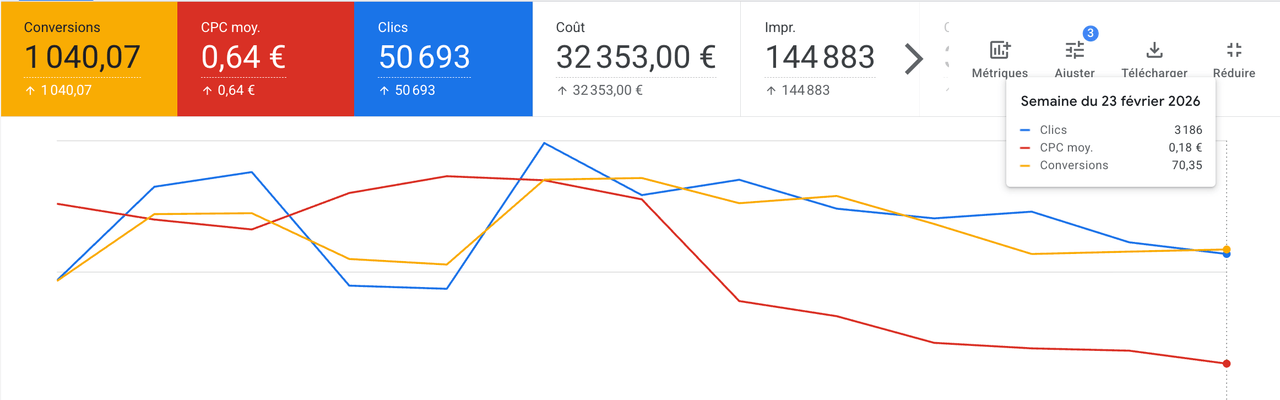
Here’s the result observed on an account where we simply changed the bid strategy (the rest of the structure was already in good shape):
- Click count stayed stable.
- Conversion count went up 12%.
- CPC dropped from $0.75 to $0.22.
- All the budget freed up on brand went into strengthening acquisition.
- We hit the same brand revenue, on a budget cut by 3×.
You’ll see — try it once and you’re sold!
There’s one small drawback to this bid strategy. If you’re an agency, your client will sometimes check for themselves whether an ad shows up on their brand. When they don’t see one, they’ll ask you to fix it urgently. That’s actually proof the strategy is working: Google isn’t spending budget on an off-target user who keeps searching the same query without ever clicking. The problem isn’t rational — it’s a matter of FOMO and bad reporting habits. It’s on you to explain the rationale, especially by showing the improved metrics on the account.
How to set up a portfolio bid strategy on a brand campaign
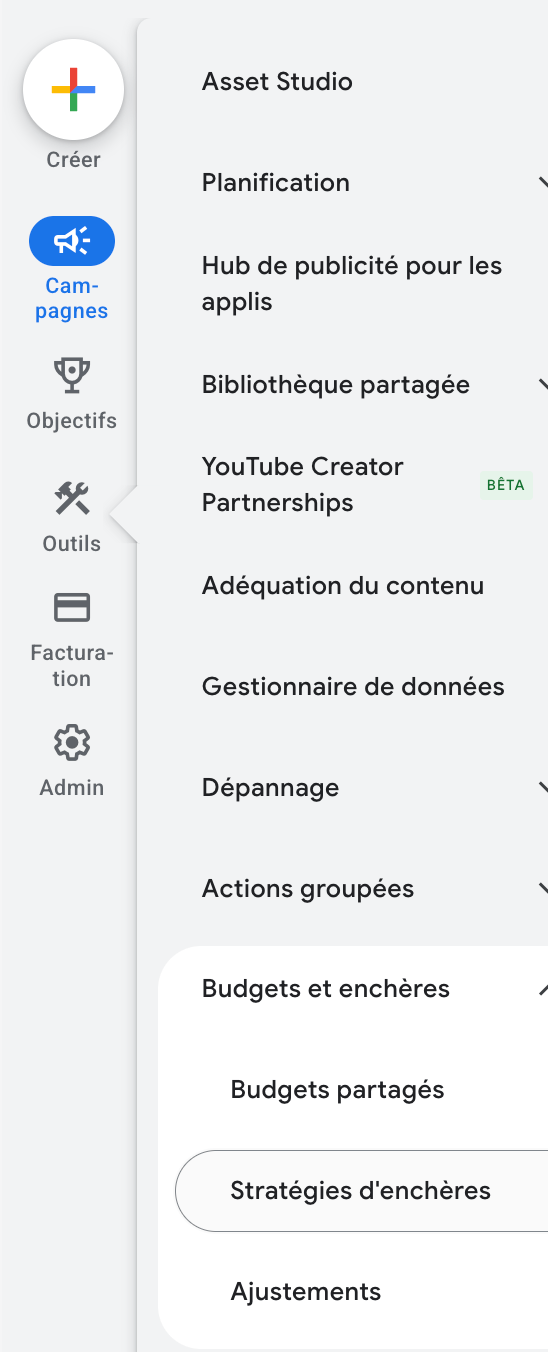
- In your Google Ads account, go to Tools > Budgets and bidding > Bid strategies.
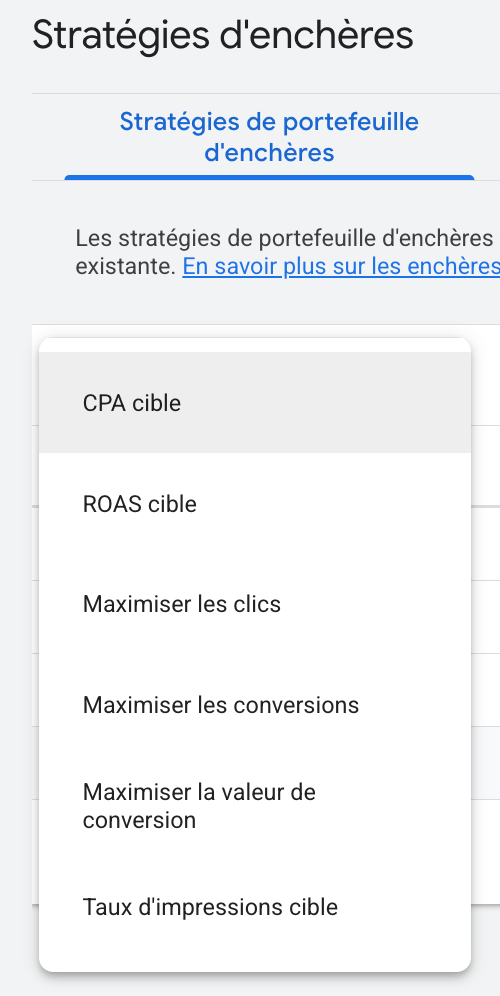
- Click the blue ”+” button, then select either Target ROAS (for ecommerce) or Target CPA (for B2B/B2C lead gen).
- If you’re an agency, select your client’s account as the Owner — not your MCC. Otherwise, if the client revokes your access, their portfolio bid strategy becomes unusable.
- Select the campaigns you want to apply this portfolio strategy to. Here, only your brand campaign(s).
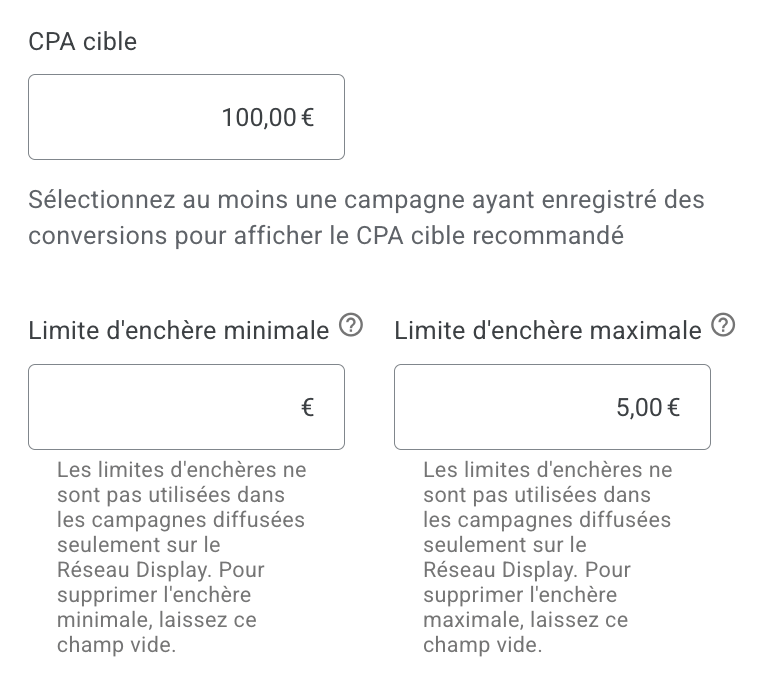
- Set a Target CPA or Target ROAS. Look at your campaign’s performance over the past 30 days. For CPA, set a goal 10% above your current CPA. For ROAS, set a goal 10% below your current ROAS. It’s safer — you give the algorithm room to maneuver at startup.
- Click Advanced options, then set your Maximum CPC under Maximum bid limit. My recommendation: go 10% to 20% below your current average CPC.
Your portfolio bid strategy is now live.
If you’ve already created a portfolio bid strategy and want to apply it again to a new campaign:
- In the campaign list, check your campaign. Don’t go into the campaign’s settings — you won’t find your portfolio bid strategy there!
- Click Edit, then Edit bid strategy.
- Pick the type of strategy: Target CPA or Target ROAS.
- Choose Use an existing portfolio strategy.
- Select the desired campaign.
- Apply.
How to optimize this portfolio bid strategy over time
Give the new strategy at least 14 days to deliver results. The first few days can be chaotic.
Then:
- Make sure you didn’t drop the Maximum CPC too aggressively, especially in one move. Better to lower it gradually week after week than all at once. Google doesn’t like sharp changes — especially when they cost it money. With a Max CPC that’s too low, you don’t just lose clicks: you mostly lose your ability to “snipe” the right clicks. Don’t be too greedy.
- Adjust your bid target (CPA or ROAS) so that your Impression Share stays above 80% but doesn’t hit 100%. The 85-95% range is the sweet spot. The 5% from 95% to 100% isn’t worth chasing — those are the clicks Google has decided to overcharge for, irregularly.
- This strategy works better when you already have conversions on the account. Google’s official thresholds are 30 conversions over 30 days for Target CPA and 50 for Target ROAS. On a brand-new account, start with Maximize Clicks plus a Maximum CPC, then switch to portfolio once those thresholds are met. Maximize Conversions (with optional Target CPA) remains a great alternative documented by Google when history is thinner. Without that history signal, the portfolio strategy risks under-delivering.
- Don’t change the bid target (CPA or ROAS) more often than once every 14 days, and only if the previous period’s data justifies it.
Now that the bid strategy is in place, you have to make sure every paid click converts as well as possible. That’s where the landing page makes all the difference.
A dedicated landing page can lift conversions by 45% on average (study)
Through SEO on your brand, prospects mostly land on your homepage. They have to navigate the site themselves and find the elements that will push them to buy or contact you.
Yet only 25% of brands deliver personalization their customers actually recognize and appreciate. Those who pull it off see 45% more conversions and 45% more customer lifetime value, according to a Deloitte Digital study of 500 B2C companies and 1,000 consumers in 2024. McKinsey reaches a similar conclusion in its Next in Personalization report: companies that excel at personalization generate 40% more revenue, and 71% of consumers now expect a personalized experience. Audience-dedicated landing pages are just one lever of that personalization. But they’re the most accessible to deploy, and the one that directly impacts your account’s already most-qualified traffic: brand clicks.
For more granular benchmarks: the median conversion rate of a dedicated landing page is 6.6% across all industries (source: Unbounce, Conversion Benchmark Report, analysis of 41,000 landing pages and 464 million visitors in 2024). A generic homepage on the same traffic typically converts two to three times worse (source: WordStream). The WordStream 2024 benchmarks confirm the gap with an average Search conversion rate of 7.52% across more than 23,000 accounts. That’s massive. On brand campaigns where clicks are numerous, cheap, and already warm, the revenue impact shows up within a few weeks.
You have to use Google Ads traffic to send users straight to a page that delivers an actionable summary requiring zero effort from them. You stop the user from getting lost on the site and you guide them step by step toward the conversion action. We’re all enemies of effort — even more so since AI joined our daily routine. In 2026, you have to lean into the gamification logic of mobile apps: a fluid sequence of screens, one action at a time, no friction, all the way to checkout.
Talk about your offers, your strengths, the reasons not to buy elsewhere. Skip the platitudes. Get to the point.
Remember these numbers:
- A user forms an opinion about your site within 50 milliseconds (Lindgaard et al., Carleton University, 2006 — original study at Taylor & Francis or open access on ResearchGate). A page that’s “wall of text after wall of text” with a hollow-sounding headline doesn’t forgive: you turn enthusiasm into skepticism. The user thinks: “This site doesn’t look serious”, “I’m going to spend an hour finding what I need”, “The other site was clearer”.
- The average time spent on a web page fits within a short window. Most visitors leave a page in under a minute, and the probability of leaving rises sharply after 30 seconds (source: Nielsen Norman Group, analysis of 25 million page views). That’s not a lot. If a user spends 30 seconds hunting for your contact form or wondering whether the package can be delivered to a pickup point, they’ll postpone the decision. Meaning: forever.
Let’s keep going on the Google Ads side.
How to easily personalize pages on your site
In an ideal world, I’d recommend rethinking each page’s purpose, then rebuilding it from scratch for every audience and every need around your brand. But that’s time-consuming, requires deep CMS knowledge (Content Management System — like WordPress or Shopify), or a responsive and committed web agency.
Following an 80/20 logic, I recommend two types of action:
- Duplicating existing pages and adapting the content (titles, descriptions, hooks, information ordering).
- Using personalization tools and JavaScript modifications triggered by URL parameters.
If you’re a service provider or a SaaS publisher:
Your site is probably made of technically simple pages built around contact forms. In 2026, I strongly recommend migrating from your CMS (Webflow, WordPress) to static HTML pages built with Claude Code or ChatGPT Codex. Just your subscription, zero hosting cost (Netlify), no maintenance, maximum security, and unbeatable web performance (it’s easy to score 100/100 on PageSpeed Insights, which will help you get cheaper ad clicks).
When you control 100% of the code, spinning up dozens of pages becomes child’s play and almost free. Claude can reproduce an entire site “pixel perfect” in a few hours. You do need to review its work, but in a day it’s done for most non-ecommerce sites. It’s an architecture shift we’re pushing on every client: few regret it. Many take the opportunity to bring the site in-house, to the great relief of IT and marketing teams.
If you’re feeling adventurous, you can even automate the variant generation and testing process with AI agents… I’m planning an article on that ;)
Back to cases where you can’t avoid a CMS, especially in ecommerce.
Duplicating existing pages
If you have a CMS like Shopify or WordPress, pick a template page with strong conversion rate, then duplicate it as a standalone page.
Then think about how to personalize the following elements based on the audience or need the page is specialized for:
- Title (H1): rephrase the customer’s need and confirm you address it.
- Hook: summarize the value your product/service delivers — the before/after the user gets at the end.
- Visuals: highlight the products most likely to interest them, or a persona (face/scene) likely to help your target audience identify with the page.
- Element ordering: bump up Q&As for already-known visitors, highlight specific argumentative blocks.
- Element visibility: hide text blocks that are useless to the buying decision to make the page more digestible.
- Element addition: information aimed at a more mature audience: integration with other tools, more advanced features, demo videos, product bundles, etc.
- Button labels: turn “Contact us” into “Try it now”, or “Book a demo” into “Try the AI module in 15 minutes”. You need to be more precise and engaging.
Many clients fear the maintenance cost: yes, you’ll have 5-10 extra pages to manage.
But that’s OK in 2026, for two reasons:
- The revenue gains from these page variants will easily cover paying someone to make changes on your site if needed.
- In 2026, AI can handle most of the modifications if you brief it well. Plenty of modules are coming out to automate updates across many pages.
Most of the time, it’s a bad excuse for not doing it.
JavaScript personalization scripts
You can fully personalize page elements with client-side code (JavaScript). In 2026, all you need is to ask Claude to open your page, tell it what you want to change, and let it propose code you can paste directly into your page (via a “Code” block on CMS like WordPress, or via Google Tag Manager HTML tags).
You no longer need expensive personalization tools to do this if your ad budget doesn’t exceed $12k/month. That’s hundreds of dollars per month in software you can put elsewhere (in advertising, ideally). Let Claude or ChatGPT walk you through the setup.
The most technical part is remembering to add specific URL parameters in the Google Ads ad groups for that audience or need.
In your Google Ads ad, instead of using a plain destination URL, you’ll add a parameter:
Ask Claude / ChatGPT to write your modification script so that it only fires when your parameter is present in the URL. That way, the script runs only for a fraction of users, based on marketing rules you define.
Which dynamic page changes to make
Recommended modifications:
- Special offer banners.
- Hide/show contextual elements.
- Force-open the chatbot to nudge contact.
- Display a phone number that’s normally hidden.
- Etc.
Trigger relevance makes all the difference: a user who lands on your page from an ad targeting a specific audience deserves a message that acknowledges that intent.
Banners and pop-ups turn out to be especially effective.
- Click-triggered pop-ups (active user intent — for example via a URL parameter that identifies the audience) can lift conversion rate by 54.42%. Compare that to the 3.94% conversion rate of exit-intent pop-ups and the 4.72% of on-load pop-ups (source: Wisepops, analysis of more than one billion impressions in 2026). The more contextual, the better!
- A countdown banner can lift conversions by about 25.48% (Sleeknote, study of more than a billion views).
- Cart abandonment pop-ups convert at 17.12% on average (Optimonk).
- Pop-ups triggered after user engagement (scroll, click) perform 40% better than pop-ups shown on page load (Popupsmart, 2025 benchmark on 10,000+ campaigns).
Why create one ad group per brand-related need
Users don’t only type your brand name. They often add modifiers:
- [BRAND] + reviews,
- [BRAND] + size guide,
- [BRAND] + documentation,
- Is [BRAND] compatible with [OTHER BRAND],
- [BRAND] and [BRAND] integration.
If a brand campaign boils down to a single ad group with your brand in exact or phrase match, you serve the same landing page to everyone. No matter what the user types: as long as your brand is in the query, they end up on the same page.
It’s an underrated optimization angle, yet risk-free and not labor-intensive.
Across 86 audited accounts, 53 weren’t handling brand-related compound queries in separate ad groups (internal study, audits on lead-gen accounts between 2022 and 2026). Advertisers rely far too heavily on sitelinks to dispatch traffic. But we already saw that sitelinks show up less than half the time.
Two scenarios that highlight the value of dedicated ad groups for brand traffic
Scenario 1: discount coupons (ecommerce)
Query: discount + brand
A user looking for a coupon code on your brand probably already has a cart on your site. Yet what do almost all advertisers do? They show the exact same ad, with the same headlines and descriptions. Worst of all, they send users to the homepage or product page they’ve already seen, and where there’s no coupon.
You absolutely have to send this user to a special page that explains shipping, returns, and makes the purchase irresistible: video testimonials, time-limited offer, low-cost upsell, discounted bundle.
It just takes one little extra push for the user to buy — but it’s not on them to find it. It’s on you to put it right under their nose.
Equivalent example: Black Friday + brand
Don’t rely solely on SEO to serve the page you’ve specially prepared for the event. Use your Google Ads ads to send as much traffic as possible to it. Don’t forget that competitors’ Google Ads ads will always sit above your organic results.
Scenario 2: documentation and integration searches (SaaS)
Queries: documentation + [software], integration [software A] + [software B].
A user looking for documentation already considers your tool in their shortlist. Why send them to a homepage or the same demo-request page they’ve already ignored? They don’t want to “contact you” or “book a demo”. They want to know if your solution integrates smoothly with their business software.
Example: does [your SaaS] integrate with HubSpot?
Their request is very specific and must be addressed specifically: an ad mentioning public documentation, paired with a dedicated page presenting your flagship integrations.
If you only knew how many customers are lost because a SaaS company didn’t think of this basic move! It’s especially painful when those potential customers might have been paying for years.
Find Google Ads search queries around your brand
Open the Keyword Planner in Google Ads and enter your brand name. You get a map of demand around your brand as soon as volumes exceed 10 searches per month.
Every one of these queries should be optimized with an ad AND a landing page in a dedicated ad group of the brand campaign. Even if your brand is young and queries don’t show up in the Keyword Planner yet, I recommend covering these themes: price, reviews and testimonials, compatibility with X-Y, refund. If you don’t see traffic now, you will soon enough.
Brand clicks with modifiers may be rare, but they’re worth gold. Segmented ad groups will cost almost nothing and bring in a lot. Your competitors are willing to bid hard on this traffic — verify it in Google Ads’ Auction Insights. Don’t let them be more relevant than you in their ad copy.
Why plan ad groups by audience
A salesperson doesn’t talk twice the same way to a customer who comes back to the store. They remember that the customer hesitated between a blue sweater and a red one. They don’t lead them to the shoe section: they know the sale will be made on sweaters. They’d say: “So, did you think it over? I find the blue sweater suits you better. It’s certified sustainable and made in France. My son has the same one, he loves it. If you change your mind, you can come back to the store within 7 days for an exchange.” You wouldn’t say: “Hello, how can I help you? We have socks on sale this week.” That’s impersonal and gives them the feeling they’re just another customer.
Apply that same logic to your website. An audience of users you already know, and whose need you’ve inferred, shouldn’t go through the same pages as on their first visit.
This is what we call remarketing, and it’s become an absolute necessity in 2026.
Which remarketing audiences to set up in Google Analytics 4
You first need to define remarketing audiences in Google Analytics 4 or via Google Ads remarketing tags.
Essentials for every site:
- Has visited the site once before (2 visits).
- Has visited the site more than twice (3+ visits).
- Has visited more than one page on the site (2+ page views).
For services companies:
- Visited the pricing page.
- Visited testimonials/reviews.
- Visited case studies or content indicating real interest in your offer.
- Started filling out the form.
- Submitted the form (to exclude).
For ecommerce stores:
- Viewed the cart page.
- Started checkout.
- Is a buyer (offer bundles, complementary products, loyalty offers…).
- Visited categories X, Y, Z.
1 audience = 1 ad group
You should create one ad group for each of these audiences in your brand campaign. And for each ad group, you’ll define:
- The headlines and descriptions that will earn the click on your ad.
- Which page best fits this audience or need.
- If no dedicated page exists for this audience, what elements to plan to personalize the content.
If you create a dedicated ad group for an audience, make sure the audience is added in “Targeting” mode, not “Observation”. Otherwise, Google will only use the audience as an observation signal and won’t restrict delivery to its members.
Watch out for the audience size threshold: Google requires a minimum of 100 active users per audience to be eligible for Targeting in Search (the floor was officially lowered from 1,000 to 100 in late 2024). Below that, your ad group simply won’t deliver. Before creating a dedicated ad group, check the audience size in Google Ads or Google Analytics 4.
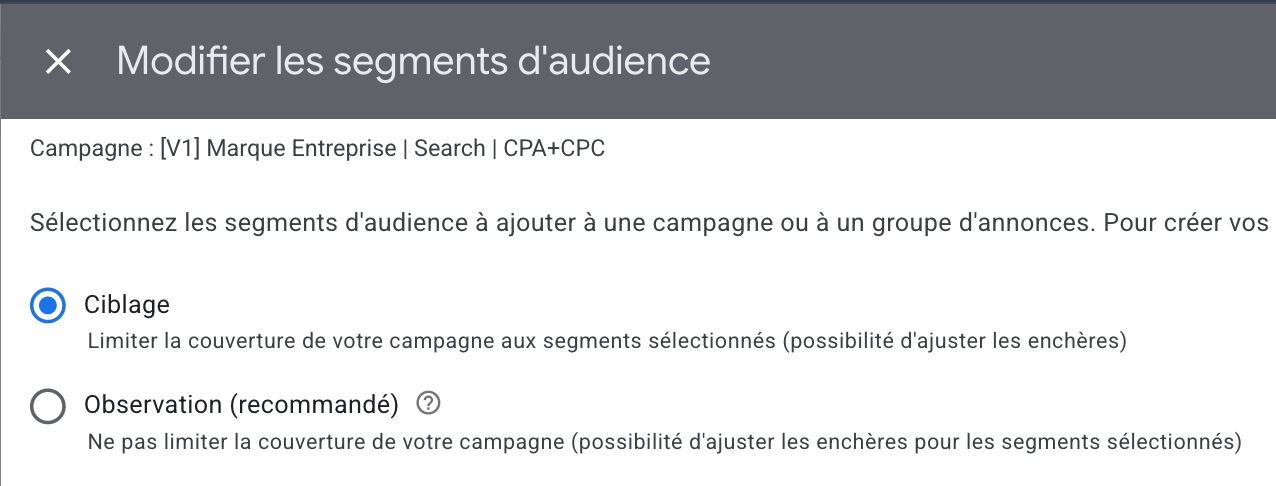
If you have a large audience, you can even combine audiences with each other and with specific keywords.
For example:
- Visitors who came 2+ times AND who type “brand + product” (keyword).
- Visitors of the reviews pages who type “brand + service” (keyword).
- And so on.
Granted: you may end up with 5 to 20 ad groups on your brand campaign depending on brand maturity. But the good news is that this campaign is one you’ll touch very little afterward. This level of precision may seem excessive. Remember you’re talking to an audience that already likes you — they’re searching for your brand — and is probably considering a purchase soon.
For meaningful gains over years, it’s worth putting in the few hours to a few days of work needed to maintain this structure, depending on your market.
Why this optimization raises the Quality Score of your brand keywords
The Quality Score on Google Ads aggregates three signals:
- Landing page experience and relevance.
- Ad relevance to the user’s query.
- Expected click-through rate on the ad.
On brand keywords, it’s easy to clear 7/10 in Quality Score. Yet many brands don’t reach 10/10 — which makes them pay more per click.
| Quality Score | Impact on cost per click |
|---|---|
| 10/10 | 50% reduction |
| 9/10 | 44% reduction |
| 8/10 | 37% reduction |
| 7/10 | 29% reduction |
| 6/10 | 17% reduction |
| 5/10 | Base rate |
| 4/10 | 25% more expensive |
| 3/10 | 67% more expensive |
| 2/10 | 150% more expensive |
| 1/10 | 400% more expensive |
Source: WordStream (Larry Kim, 2013), confirmed by Google (without exact figures). The mechanism remains valid in the Smart Bidding era: WordStream reaffirmed in 2026 that Quality Score continues to modulate the actual CPC, and Optmyzr confirms it remains one of the few structural signals an advertiser can directly steer.
For each Quality Score point above 5/10, CPA drops by 16% on average. Below that, it goes up by 16% per point. Lifting a brand keyword from 7/10 to 10/10 means saving at least 21% in cost per click. On all your brand clicks. For years. That’s thousands of dollars saved every year for brands with strong search volume.
Convenient timing: the method I’m advocating (segmented keywords, dedicated ads and pages) already ticks many of the boxes for hitting 10/10. Google confirms it in its official documentation.
One more reason to take your brand campaign seriously.
Should you use broad, phrase, or exact match for your brand?
If you follow my method (dedicated ad groups per need, portfolio bid strategy, dedicated ads and pages), use phrase match keywords for the brand.
Across 86 audited accounts, I measured an average CPC gap of 22% between accounts on exact and accounts on phrase for the same brand keywords, structure being equal (observational comparison, consecutive 30-day windows before/after the match-type switch, no change in bid strategy or budget). Phrase match captures more long-tail variations (with cheaper CPC) and feeds Smart Bidding more efficiently.
Why not use exact match
Because you’ll let too many clicks slip through on exotic queries that you should handle, not ignore.
A phrase match keyword will, by default, capture an exotic query in its most generic ad group (usually “brand”). That doesn’t respect the principle of “1 search term = 1 dedicated landing page”. But it’s still better than leaving the click to a competitor or to SEO, which will route it to your homepage.
Why not use broad match
Because Google may bid on your competitors. And the bid strategy I recommend on brand campaigns isn’t ideal for targeting competitors: your Max CPC isn’t high enough, and you risk pulling in low-quality traffic.
Google also tends, on broad match, to look for new traffic sources that lean toward pure acquisition rather than brand. On Smart Bidding acquisition campaigns, Google estimates that broad match can lift conversions by 25%. That expansion of the potential query spectrum is the opposite of what we’re after on a brand campaign: we want to send each click to the best page. Each new search term that drives meaningful volume needs its own strategy in the campaign.
Monitor your search terms at least once a week: add the relevant terms to your brand campaign and exclude the noise.
What does the perfectly optimized brand campaign structure look like?
Here’s the target structure, as I deploy it on audited accounts. On average, 5 to 20 ad groups, with 1 ad and 1 landing page per group.
“Brand” campaign:
- Bid strategy: portfolio (Target CPA OR Target ROAS) + Maximum CPC.
- Keyword match type: phrase match only.
- Ad groups by need (4 to 15 depending on the brand), e.g.:
[brand](generic),[brand] + reviews / testimonials,[brand] + price / pricing,[brand] + documentation / integration,[brand] + coupon / discount / Black Friday,[brand] + refund. - Ad groups by audience (Targeting mode, 1 to 5 audiences): 2+ page-view visitors, pricing-page or case-study visitors (B2B), product viewers or abandoned-cart users (ecommerce), existing buyers (cross-sell, loyalty).
- Ads: 1 ad per group, aligned with the targeted need or audience.
- Landing pages: 1 dedicated page or 1 URL-parameter personalization for each group, never the homepage.
Each ad group points to a dedicated page or a page personalized via URL parameter. No ad ever points to the homepage.
What this campaign looks like inside Google Ads (illustrative data)
Here’s the “Ad groups” view filtered on the brand campaign over 30 days, across two typical cases: a B2B SaaS and an ecommerce site. The structure is identical on both sides; what changes is the bid strategy (Target CPA vs. Target ROAS) and therefore which KPI column you watch first.
Both tables follow the official Google Ads UI column names. The “Cost / conv.” and “Conv. value / cost” columns are usually renamed “CPA” and “ROAS” via custom columns inside agencies. The “Status” column is hidden because every ad group in this view is eligible. Click the ▸ chevron on each ad group to expand and see its underlying phrase-match keywords.
Case 1 — B2B SaaS (Target CPA). The goal is cost per qualified lead. The “Conversions” column counts contact-form submissions or demo requests (with company-size field). The fictional brand is named “Rovela” (mid-market SaaS, target audience: CTOs / IT leaders).
| Ad group | Clicks | Avg. CPC | Conversions | Cost / conv. |
|---|---|---|---|---|
| [Rovela] generic (phrase) | 1,240 | $0.65 | 40 | $19.95 |
| "rovela" | 1,240 | $0.65 | 40 | $19.95 |
| [Rovela] + reviews / testimonials | 380 | $0.90 | 21 | $16.26 |
| "rovela reviews" | 240 | $0.85 | 14 | $14.44 |
| "rovela testimonials" | 140 | $1.00 | 7 | $19.89 |
| [Rovela] + pricing | 290 | $0.99 | 18 | $15.98 |
| "rovela pricing" | 175 | $0.94 | 12 | $13.65 |
| "rovela price" | 115 | $1.08 | 6 | $20.63 |
| [Rovela] + docs / integration | 156 | $0.75 | 6 | $19.57 |
| "rovela docs" | 95 | $0.73 | 4 | $17.23 |
| "rovela integration" | 61 | $0.80 | 2 | $24.27 |
| Audience: 2+ pageviews (Targeting) | 218 | $1.35 | 11 | $26.67 |
| "rovela" | 218 | $1.35 | 11 | $26.67 |
| Audience: Pricing-page visitors (Targeting) | 116 | $1.53 | 7 | $25.21 |
| "rovela" | 116 | $1.53 | 7 | $25.21 |
| Total: ad groups | 2,400 | $0.84 | 103 | $19.55 |
Case 2 — Apparel ecommerce (Target ROAS). The goal is return on ad spend (conversion value / cost). Conversions are purchases with an average order value around $90. The “ROAS” column is a ratio: 19.1 = $19.10 of revenue per $1 spent. The fictional brand is named “Linéa”.
| Ad group | Cost | Conversions | Conv. value | Conv. value / cost |
|---|---|---|---|---|
| [Linéa] generic (phrase) | $687.96 | 165 | $13,127.40 | 19.1 |
| "linéa" | $687.96 | 165 | $13,127.40 | 19.1 |
| [Linéa] + reviews / shipping | $170.59 | 28 | $2,227.68 | 13.1 |
| "linéa reviews" | $108.11 | 18 | $1,432.08 | 13.2 |
| "linéa shipping" | $62.48 | 10 | $795.60 | 12.7 |
| [Linéa] + sale / promo | $196.92 | 52 | $4,015.44 | 20.4 |
| "linéa sale" | $119.70 | 32 | $2,471.04 | 20.6 |
| "linéa promo" | $77.22 | 20 | $1,544.40 | 20.0 |
| [Linéa] + dresses (signature category) | $112.79 | 22 | $2,007.72 | 17.8 |
| "linéa dresses" | $70.67 | 14 | $1,277.64 | 18.1 |
| "linéa dress" | $42.12 | 8 | $730.08 | 17.3 |
| Audience: Product viewers, no purchase (Targeting) | $290.63 | 51 | $5,370.30 | 18.5 |
| "linéa" | $290.63 | 51 | $5,370.30 | 18.5 |
| Audience: Cart abandoners (Targeting) | $143.21 | 39 | $5,201.82 | 36.3 |
| "linéa" | $143.21 | 39 | $5,201.82 | 36.3 |
| Total: ad groups | $1,602.10 | 357 | $31,950.36 | 19.9 |
Three markers of a well-built brand campaign, readable in both cases once the ad groups are expanded:
- Brand CPC 5 to 10x lower than non-brand CPC in the same vertical. B2B SaaS brand: $0.65-$1.53 (vs. 2026 non-brand benchmark of $8-14, up to $16-18 for cybersecurity / FinTech). Ecommerce: typically $0.30-$0.90 (vs. non-brand $1-3). A direct effect of Quality Score lifted by keyword / ad / landing-page coherence.
- Cost / conv. (CPA) divided by 5 to 10, or Conv. value / cost (ROAS) multiplied 5 to 10x, vs. non-brand campaigns. The brand campaign provides the volume of qualified conversions the algorithm will then replicate elsewhere (Google’s official thresholds: 30 conversions / 30 days for Target CPA, 50 conversions / 30 days for Target ROAS).
- Volume spread across 4-6 by-need ad groups and 1-2 by-audience ad groups, each with 1-2 phrase-match keywords. A single row in this view (one generic ad group with one exact-match keyword pointing to the homepage) is the signature of a lazy campaign — the kind described in the previous article.
Page personalization must remain your priority
The recommendations I’ve made on Google Ads structure are at most a few hours of work. Once the “1 need / 1 audience = 1 ad group” structure is in place, maintenance is extremely low. It’s a quick-win.
The real subject that should take most of your time is page personalization. It’s great to have cheaper clicks and dedicated pages, but the user has to convert better on the red carpet you’ve rolled out. Conversion rate optimization is the key to success on Google Ads.
In the next article, you’ll be able to explore two mini-sites — one services, one ecommerce. You’ll find concrete examples of every technique I use to optimize the conversion rate of brand campaigns (along with other best practices on other topics).
The brand campaign structure I’m recommending is the perfect illustration of what separates good accounts from bad ones: alignment between the keyword, the ad, and the landing page. The more mature the account, the more this kind of action is necessary. Too many consultants stop at technical setup, which doesn’t bring much past a certain conversion volume. Smart Bidding often no longer needs you to perform at the account level. It does, however, need you to perform at the site level. Optimizing the brand campaign is by far the easiest playground to apply this logic without risk and with concrete results.